Features Reference
How each major system works under the hood. You configure all of these with a command —
this page is for when you want to understand or extend your own app. Most features are
off by default and gated by a KitConfig switch, so a fresh clone builds and runs with
no backend keys.
Looking for the UI side? Each feature also has a Screen page (what the user sees) and the non-UI engines are in Managers & Repositories.
Authentication
Configure with: /kit-setup-auth · Switch: KitConfig.AUTH_ENABLED, AUTH_PROVIDER
A provider-agnostic AuthRepository with three implementations:
- Supabase (recommended) — email + Google, via Credential Manager (native sheet) with an OAuth deep-link fallback
- Firebase Auth — email + Google (needs
google-services.json)
Per-method toggles: EMAIL_SIGN_IN_ENABLED, GOOGLE_SIGN_IN_ENABLED independently show the
email form and the Google button. Session state is a Flow that drives the nav guard —
sign-out from any post-auth screen routes back to the sign-in screen. Account + data
deletion (Play-mandatory) wipes the auth account, DataStore, and Room.
Google sign-in needs two Google Cloud OAuth clients — a Web client (Supabase ↔ Google) and an Android client (on-device sheet, keyed by your SHA-1). The command walks both; release SHA-1 is registered later by
/kit-publish-to-play.
Paywall & subscriptions
Configure with: /kit-setup-paywall · Switch: KitConfig.PAYWALL_ENABLED, PAYWALL_MODE
Uses RevenueCat. The paywall UI is RevenueCat's prebuilt Compose Paywall — you design
it and set prices in the RevenueCat dashboard, not in code. The kit wraps it with a listener
that forwards purchase/restore to navigation.
- SOFT mode — skippable ("Maybe later")
- HARD mode — blocking; Home only after subscribing
PurchaseManager exposes isPremium / customerInfo / currentOffering as StateFlows
and drives the nav resolver (subscribers skip the paywall). The com.android.vending.BILLING
permission stays commented in the manifest until /kit-setup-paywall enables the paywall, so
free apps ship without it. Builds and no-ops without an API key.
Going live takes lead time. Two clocks start after your first run and take days: the RevenueCat↔Play service-account link (~36 h to propagate) and getting a build onto an internal testing track (products only load there). Start them early —
/kit-start-setupoffers to kick them off after the first build.→ Full guide: Paywall & Subscriptions — products, Play billing setup, the release-time steps, testing with a promotional entitlement, and troubleshooting.
Analytics & crash reporting
Configure with: /kit-setup-analytics · Switch: KitConfig.ANALYTICS_ENABLED, SENTRY_ENABLED
One AnalyticsManager fans out to whichever you enabled:
- PostHog — product analytics + funnels
- Firebase Analytics — events
- Crashlytics — crash reporting
- Sentry — crashes + rich breadcrumbs + release health
Product analytics respects the user's privacy toggle (Settings → Privacy). Crash
reporting is never gated — you always get crash reports. Logging goes through Timber;
release builds plant a CrashlyticsTree and/or SentryTree so Timber.w(...) becomes
breadcrumbs and errors become non-fatals.
Plan release-specific events + a funnel with
/kit-plan-release-analyticsbefore each ship.
AI features
Configure with: /kit-setup-ai · Switch: KitConfig.OPENROUTER_ENABLED, OPENROUTER_DEFAULT_MODEL
OpenRouterAiRepository calls any model through one OpenRouter key — Claude, GPT,
Gemini, Llama, 100+ models. Methods are model-first (the model changes most often per
call) and use-case-generic:
generateText(model, prompt, systemPrompt?)generateTextWithMessages(model, messages, temperature?, maxTokens?)streamText(...)—Flow<String>SSE chunksgenerateJson(...)— structured output
It's a separate Retrofit instance (retrofit_openrouter) isolated from your app's own API,
so it never collides with a backend you add. Plumbing only — no sample chat screen.
Remote config, update gate & maintenance
Configure with: /kit-setup-updates · Switch: KitConfig.REMOTE_CONFIG_PROVIDER
RemoteAppConfig reads conventional keys from a backend you choose — LOCAL (default,
offline), Supabase (a public app_config table — the command prints the SQL), or
Firebase Remote Config. These power, all without shipping an app update:
- Force / soft update gate —
UpdateManagercompares the running version tomin_supported_version/latest_version;UpdateGateshows a blocking or dismissible sheet - Maintenance mode —
maintenance_mode+maintenance_message→ full-screen takeover - In-app changelog —
ChangelogManagerparsesapp_changelogJSON; a "What's New" sheet shows on version bump (suppressed on fresh install)
This is the kill switch: flip maintenance_mode or bump min_supported_version in your
backend and every installed app responds on next launch.
Localization
Configure with: /kit-translate
Ships English-only. Every user-facing string lives in res/values/strings.xml. Add any
language and the command translates the strings, writes values-<tag>/strings.xml, and wires
the locale config. RTL languages (Arabic, Hebrew, Urdu) flip the layout automatically.
The Settings Language row auto-hides when you ship only one locale.
/kit-translate supports all of these languages (pick any, multi-select):
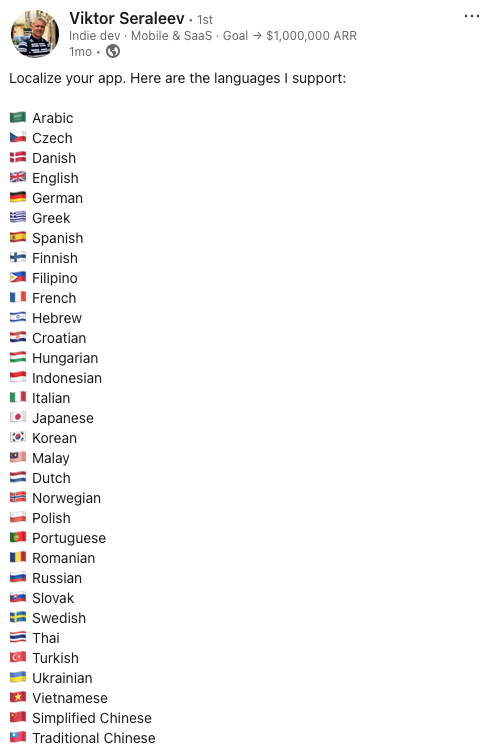
Don't see one? Tell /kit-translate any language — it can translate to any locale Android
supports, not just this list.
Security — SecureDataStore
core/security/SecureDataStore.kt encrypts dev-held secrets (user-entered API keys,
third-party OAuth tokens) with AES-256/GCM, master key in the Android Keystore,
stored in a dedicated DataStore file. No extra dependencies. Your Supabase / Firebase /
RevenueCat tokens are already encrypted by those SDKs — this is for your secrets.
Ops & launch tooling
- In-app review —
/kit-setup-review-dialogwires the Play in-app review prompt at a trigger you choose; the Settings → Rate button opens your Play listing directly. - Open-source licenses — Settings → About lists every dependency (via AboutLibraries).
- CHANGELOG — Keep-a-Changelog format;
/kit-publish-to-playreads it for release notes. - Legal —
/kit-generate-legalwrites a privacy policy + Data Safety form from your code.
The two-layer config model
Everything above is one of two kinds of config, kept strictly separate:
KitConfig | RemoteAppConfig | |
|---|---|---|
| When | Compile-time | Runtime |
| Who edits | The setup commands (once) | You, in your backend (anytime) |
| Examples | AUTH_PROVIDER, PAYWALL_MODE, OPENROUTER_ENABLED | maintenance_mode, min_supported_version, app_changelog |
| Change = ? | New app build | No build — live |
You rarely edit either by hand. The commands handle KitConfig; your backend dashboard (or
the SQL the command printed) handles RemoteAppConfig.
Back to: Documentation home · The Flow · Commands