0 to Google Play
Every step in NowKit is a command. You answer questions; your AI agent writes the code, edits the config, and runs the builds.
A few big commands (the green ones) run a whole sequence for you — the commands they run inline are listed as plain steps underneath. Everything else you run on its own when you need it. Read top to bottom: that's the path from clone to a live listing on Google Play.
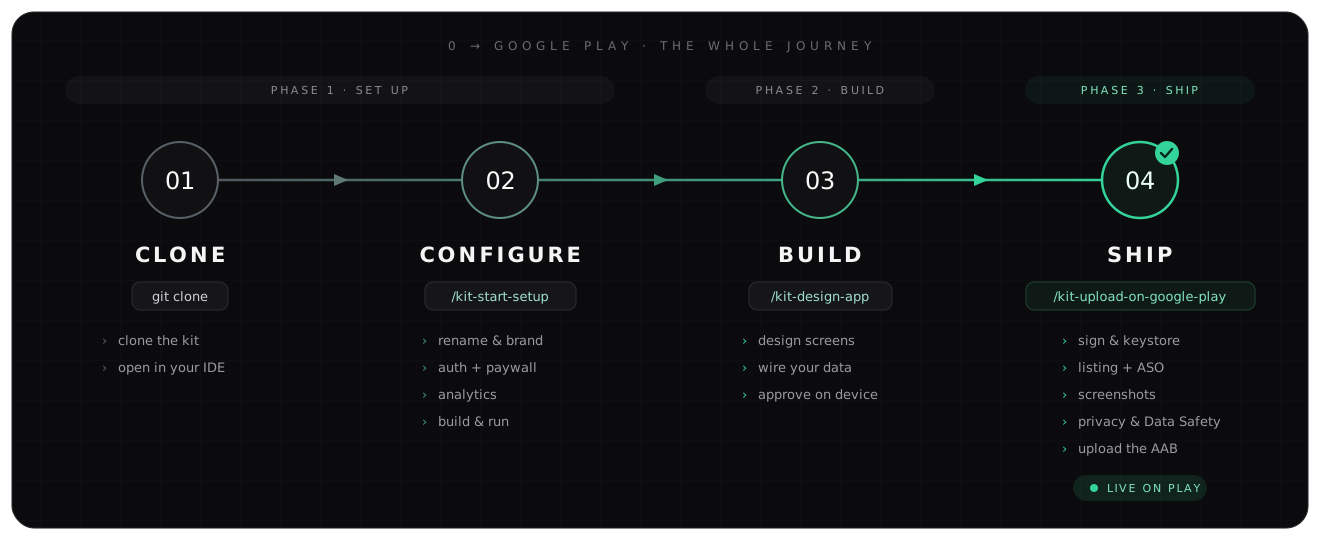
Set up
/kit-start-setupOne guided run: rename → brand → auth → paywall → analytics → build. At the end you have your own app running on your phone — not a demo. It runs these for you:
/kit-env-check— check your machine has JDK, Android SDK,adb(run first)/kit-change-app-id— your package name + app name/kit-setup-theme— brand color + icon pack/kit-setup-auth— Supabase / Firebase / none/kit-setup-paywall— RevenueCat paywall (free apps skip)/kit-setup-analytics— PostHog / Firebase / Crashlytics / Sentry/kit-run-app— compile, install, launch on your device
Every nested command is also standalone. Stopped halfway, or want to change one thing later? Just run that single command — they detect what's already set and offer to keep, change, or redo it.
Build
/kit-design-appBuild your app's own screens: layout first with dummy data (you approve the look), then wire real data — Supabase / Room / your API — without touching the approved layout.
/kit-plan-monetizationPick a pricing model, choose which features to lock, set prices, and wire the premium gates
in. Runs /kit-setup-paywall first if the paywall isn't set up yet.
Ship
/kit-publish-to-playThe whole Google Play release, walked one step at a time in the order that avoids the maze (first version or update). It pulls in:
/kit-sign-release— release keystore + signed AAB/kit-generate-legal— privacy policy + Play Data Safety, from your actual code/kit-generate-aso— Play listing copy (title + descriptions)/kit-generate-screenshots— Play Store screenshots/kit-generate-landing— static landing page + the public privacy URL Play requires/kit-generate-changelog— "What's new" notes from your git history/kit-plan-release-analytics— a release conversion funnel, auto-wired
🎉 Google reviews it (hours to a couple of days for a first app), then it's live.
Anytime (optional)
Run any of these whenever the moment comes — none are required to ship:
/kit-setup-ai— AI features (OpenRouter, one key, 100+ models)/kit-design-onboarding— swap the 3-page intro for a Calm / Headspace-style quiz/kit-translate— add languages ·/kit-translate-listing— translate the Play listing/kit-setup-updates— remote config + force/soft update gate + push/kit-setup-review-dialog— in-app Play review prompt at a trigger you choose/kit-save-to-github— back up to your private GitHub repo/kit-pre-register-setup— put the app on Google Play pre-registration/kit-compile-app— compile-check ·/kit-run-app— run on device/kit-update— pull the latest kit commands + skills (your code is untouched)
Not sure which choices to make? Example Recipes show the exact answers for five kinds of app. Looking up one command? Commands Reference.